
A company’s existence depends significantly on sales, as they generate the actual revenue that fills everyone’s pockets, from the executive to the CEO.
The workflow in any industry, whether product or service, revolves around obtaining leads, converting them into customers, maintaining the relationship, and repeating the pattern to acquire new business. It sounds simple, but it isn’t, and it demands a fair level of management.
The term ‘CRM’ is everywhere, and you’ve likely heard it even if you’ve never used it. Your competitors and professional networks already rely on CRM software to run their operations, so why aren’t you?
Put simply, your CRM sales process is the system that keeps every lead moving toward a closed deal. In this guide, we’ll cover what a CRM is, what a sales process looks like, what quietly stalls your sales growth, and exactly how a CRM optimizes every stage from first lead to closed deal.
What Is CRM Software and Why Your Business Needs One?
CRM is an acronym for Customer Relationship Management.
CRM software is the technology that helps entrepreneurs in capitalizing prospects, optimizing the resources, forecasting the business, and nourishing the relationship with existing clients.
CRM software streamlines the process and increases the overall work productivity of the team on account of advanced modules.
From the elementary stage when simple contact is introduced to a company, it goes through the entire sales cycle and becomes an existing client; CRM takes care of each step and manages after-sales service. Thus, it becomes a powerful system that manages a business.
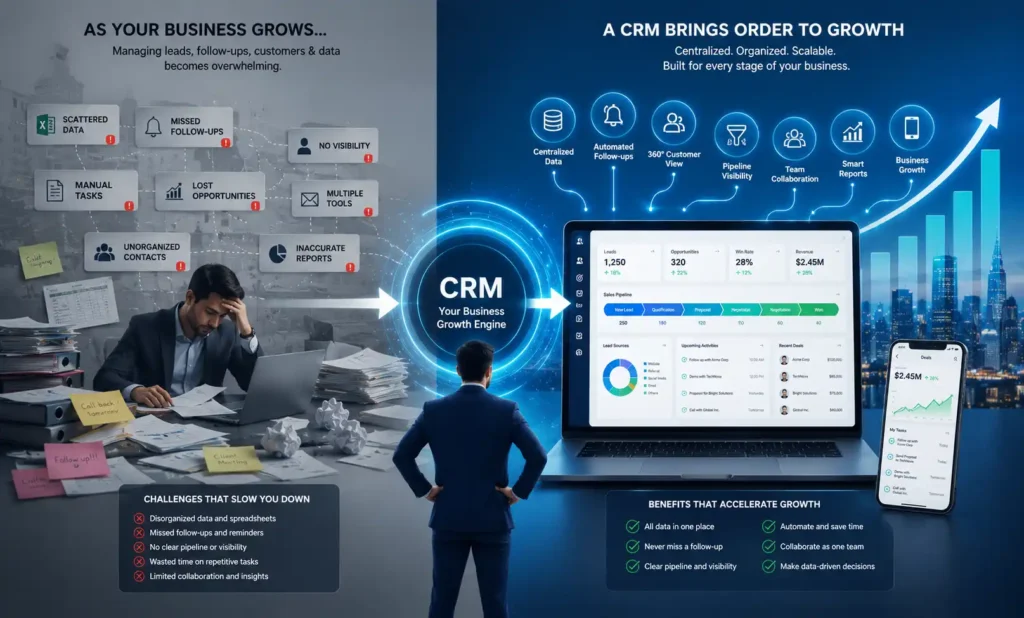
When your business has a manageable count of customers, you can easily keep control over the transactions and updates associated with the clients, and supervising your business is comparatively simple. But, as the company expands, managing a pile of leads, prospects, existing customers, follow-ups, closures, employee-wise contribution in revenue, etc. becomes complex. Thus, your business needs a buddy that is a CRM.
But before we look at how a CRM does that, it’s worth being clear on what a sales process actually is.
What Is a Sales Process?
A sales process is a structured approach constructed to achieve higher and better sales. This approach generally consists of a set of repeatable steps or a pattern followed by the sales team.
Every industry, whether product or service, follows this classic sales process, though the workflow might vary. Every salesperson confronts the customer’s reluctance and the hassle of convincing.
The life of a sales executive revolves around endless follow-ups and yes, they do not have a scope of missing on any lead. This huge pyramid of barriers always stands in the way of closing sales deals, and a typical sales cycle can go up to 3 months or even more. This entire cobweb isn’t child’s play and needs a program to keep the sales process well organized from tip to toe.
A well-organized process also means reaching out to new leads without delay. Learn how faster response times can improve conversions in our guide to speed to lead.
The only answer to all the sales wrestling is good CRM software.
What Can Stop Your Sales Growth?
“Growth and comfort do not coexist,” said Ginni Rometty.
In sales, the things blocking growth are rarely the obvious ones. Most businesses pour effort into the visible stuff: hiring good talent, training them, rewarding top performers, running PIPs for the rest. But the real leaks are quieter and internal:
- Leads slip through the cracks. With no single system, enquiries sit in inboxes, notebooks and WhatsApp chats. The ones nobody follows up on simply go cold.
- No accountability. When activity isn’t tracked, you can’t tell who followed up, who didn’t, or why a deal stalled. Everything runs on memory and verbal updates.
- Missed follow-ups. A sales cycle can run for months, and a single skipped follow-up at the wrong moment loses the deal.
- Decisions based on guesswork. Without accurate data on your pipeline, forecasting and resourcing become gut feel rather than fact.
Notice the common thread? Every one of these comes down to scattered, untracked information. And for most teams, that scatter lives in one place: their spreadsheets.
This is precisely the problem we unpack in our piece on why real estate agents struggle to convert leads.
CRM vs Excel: Why Spreadsheets Fall Short
Most businesses run on a pile of sheets and documents scattered across random locations. Take something as basic as contact management. Here’s what a spreadsheet handles versus what a CRM tracks:
What you can track | Excel sheet | CRM software |
Name, contact, address, email, status |
|
|
Lead category & history |
|
|
Live follow-ups |
|
|
Sales pipeline stage & funnel |
|
|
GPS |
|
|
Business expected |
|
|
Calendar (Google Calendar synced) |
|
|
Updates without manual entry |
|
|


Contact management is a core business function every other activity is built on it. But it’s just one function, and Excel sheets can’t manage the complex data of an entire business automatically.
Unlike sheets, CRM software doesn’t depend on humans for updates and is completely process-oriented.
Your company holds critical information and sensitive data gathered over years, and you don’t want to put it at risk. When it isn’t organized, you lose data, miss lead history, skip follow-up dates, miss emails, and turn decision-making into guesswork.
It’s not only the sales department that needs a CRM, but your whole operation also craves it, you just don’t know it yet.
Most entrepreneurs try to fix internal issues but fail for one reason: a lack of accurate information. And that’s the one thing a CRM gives you that spreadsheets can’t — which is exactly where it starts optimising your sales process.
How Does a CRM Optimize Your Sales Process?
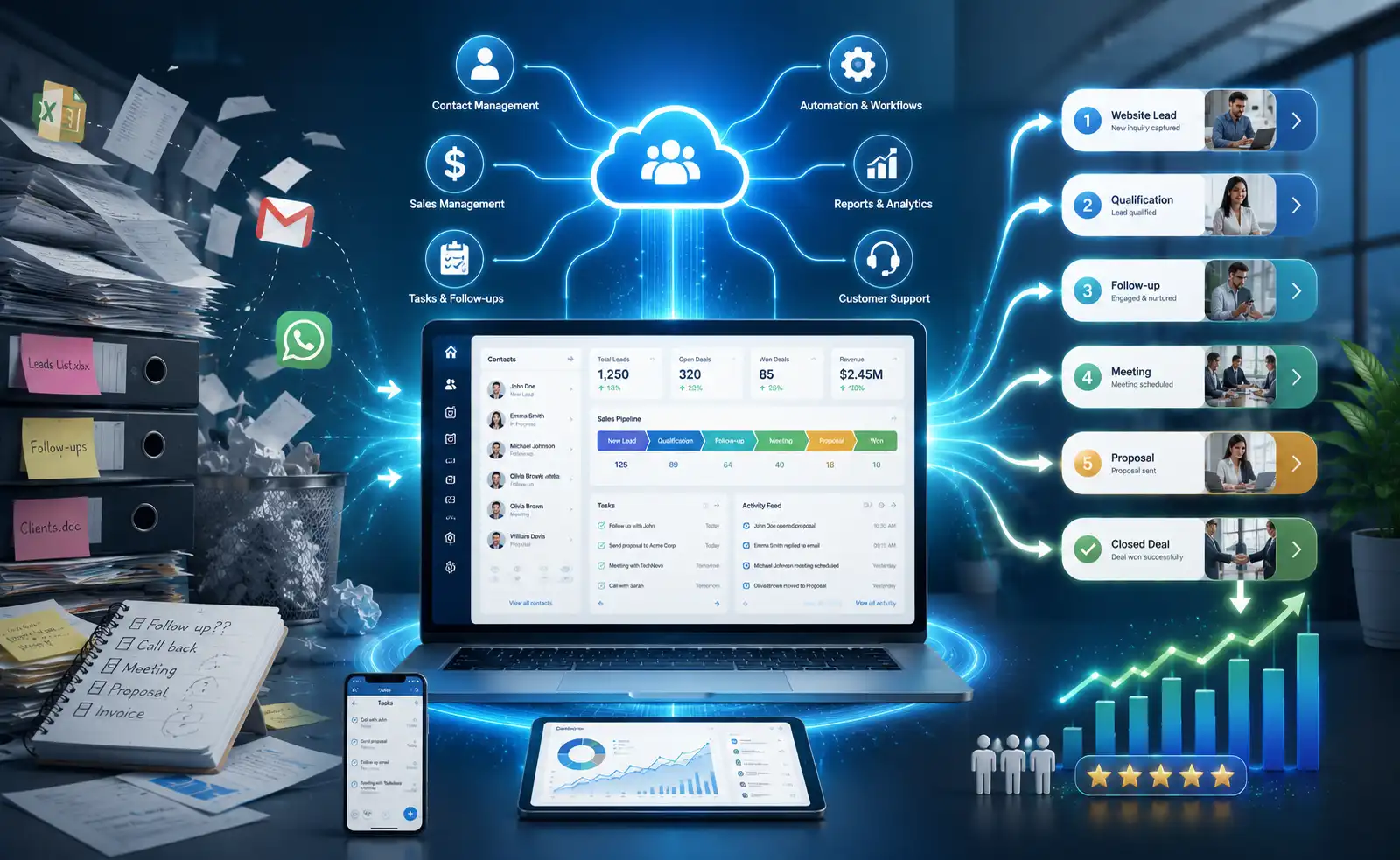
Your CRM sales process starts from day one. The moment leads come in from different channels; calls, emails, digital marketing, website inquiries, word of mouth etc, the CRM captures each one, stores it category-wise, and documents every activity tied to it.
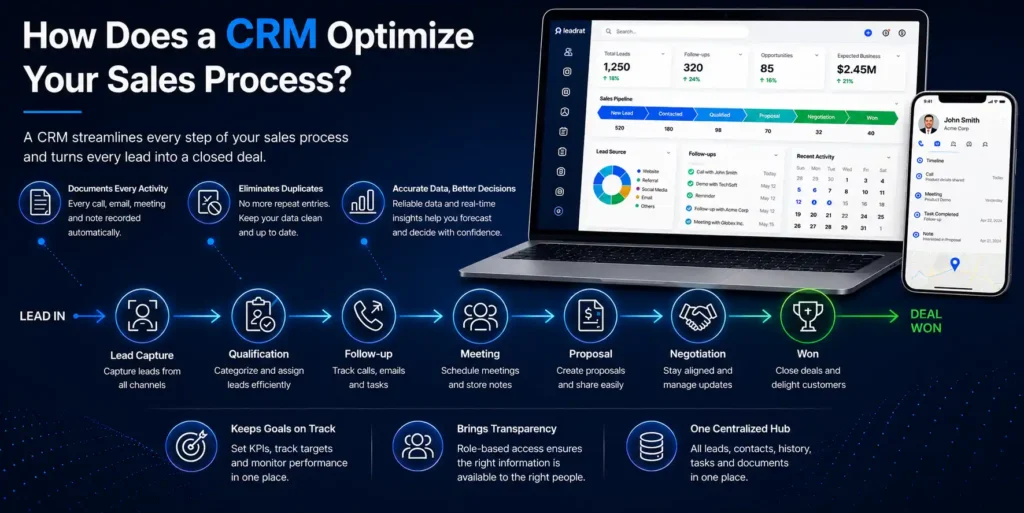
Salespeople manage their calls, follow-ups, meeting notes and tasks inside it, accessible from any device, anywhere. From there, it becomes the foundation that keeps your whole sales process running to plan, turning every lead into a closed deal.
The benefits of CRM for sales show up at each stage:
- Documents every activity: Spreadsheets can store data but can’t document everything in one place. A CRM records all the stages of the sales process and keeps the sales funnel up to date without missing anything.
- Eliminates repeat entries and manual work: No more maintaining leads by hand in Excel. A good CRM blocks duplicate entries and frees your team to spend their time chasing new business instead.
- Decisions on accurate data, not assumptions: A MarketWatch study found roughly 88% of spreadsheets contain errors, a shaky base for business decisions.
A CRM gives you reliable data, so you forecast from your sales funnel instead of guesswork and verbal influence.
- Keeps goals on track: Clearly defined KPIs and individual targets, monitored in one place, so everyone has a goal to hit not just the top performer.
- Brings transparency: User-based access lets your team see the information they need instantly, cutting out the extra steps and manual chasing.
- One centralized hub: Leads, follow-ups, customer details, communication history, meetings everything under one roof.
Top Features of a CRM Software
Beyond optimising the process, a good CRM gives your team a set of day-to-day tools that do the heavy lifting:
- Enjoy advanced contact management: CRM software helps your business store customers’ detailed information safely in a centralized hub. It gives uninterrupted access to your team while working, and they can always stay updated.
Above all, you can stay assured as your sensitive data is always safe.
- Schedule like a pro: The calendar module of CRM software gives a wonderful experience to your people as they can efficiently manage their daily schedules and meetings on their mobile phone itself.
CRM allows you to prioritize important meetings and calls, which gives more time to your prospects, leading to a higher conversion ratio.
- The talented task management: With CRM software you can do more in life! Just manage all your tasks from the system and stay ahead of your own benchmark.
You can create, update, and assign projects and daily tasks from the mobile app. You can also create small sub-tasks for a parent’s ongoing task. This process is known as a task-tree.
- Stop wondering, start achieving: Managing your CRM sales funnel well is what separates teams that hit targets from teams that don’t. By tracking each activity, the CRM automatically builds a pipeline showing the exact status of every cold, warm and hot lead so your team stops creating funnels manually and focuses on converting cold to warm, and warm to hot.
- Automated reports: CRM helps you monitor yourself, because everything that can be tracked can be achieved. CRM creates automated activity reports daily so you can stay up to date.
A CRM also decides which team member gets each lead. See our guide to lead routing to learn how it works.
Selling property? The same sales process applies, just with longer cycles and more lead sources. See our complete guide to a real estate CRM for the industry-specific version.
Conclusion
Most teams don’t lose deals because they lack leads, they lose them quietly: follow-ups get missed, leads go cold, and decisions run on guesswork instead of data.
A CRM is what solves it. By keeping your entire sales process in one place; every activity logged, no repeat data entry, accurate data for decisions, goals tracked, and your whole funnel under one roof, a CRM turns a leaky, manual process into one your team can actually run on. That’s what optimising your sales process really means: not working harder, but never letting a deal slip through the cracks.
 Stop Chasing Leads. Start Closing Them.
→Book your free demo of Leadrat Real Estate CRM today and see your sales process run on autopilot.