
99acres gave you a lead at 10am.
You got another one from Facebook ads at 11. Then, two walk-ins happen at the site office by afternoon. A referral from a past client at 6pm.
By the end of the week, you’ve got around 40 leads scattered everywhere; some on your phone, a few buried in a WhatsApp group, others in a spreadsheet someone made months ago, and a couple scribbled on a sticky note stuck to your desk.
Three weeks later, you close a deal or two. The other 38? You genuinely don’t know where they went.
This isn’t really a lead-generation problem. Most real estate professionals don’t struggle to get leads; the market usually takes care of that. The real challenge starts after the lead comes in.
That’s exactly what a real estate CRM is built to solve.
This guide covers everything you need to know; what a real estate CRM actually is, why generic tools don’t cut it for property sales, what features matter, and how to choose the right one for your setup, whether you’re a solo broker, an agency running a team, or a builder managing multiple projects.
What is a Real Estate CRM?
A real estate CRM (Customer Relationship Management) software is a centralised system that captures, tracks, and manages all your leads and client interactions in one place from the moment a lead comes in to the moment a deal is closed.
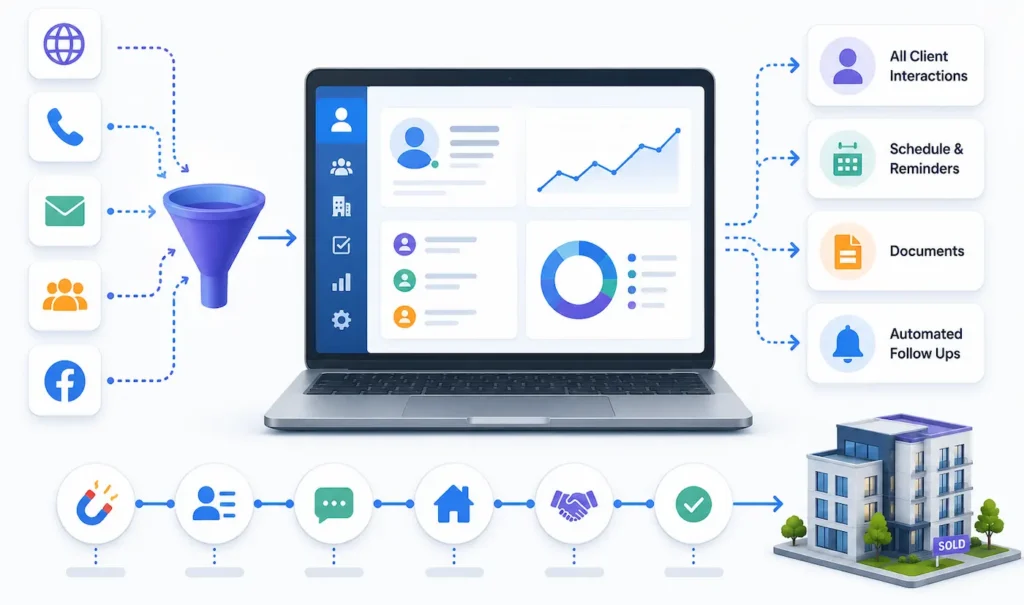
Think of it as the operating system that keeps your entire sales process running smoothly.
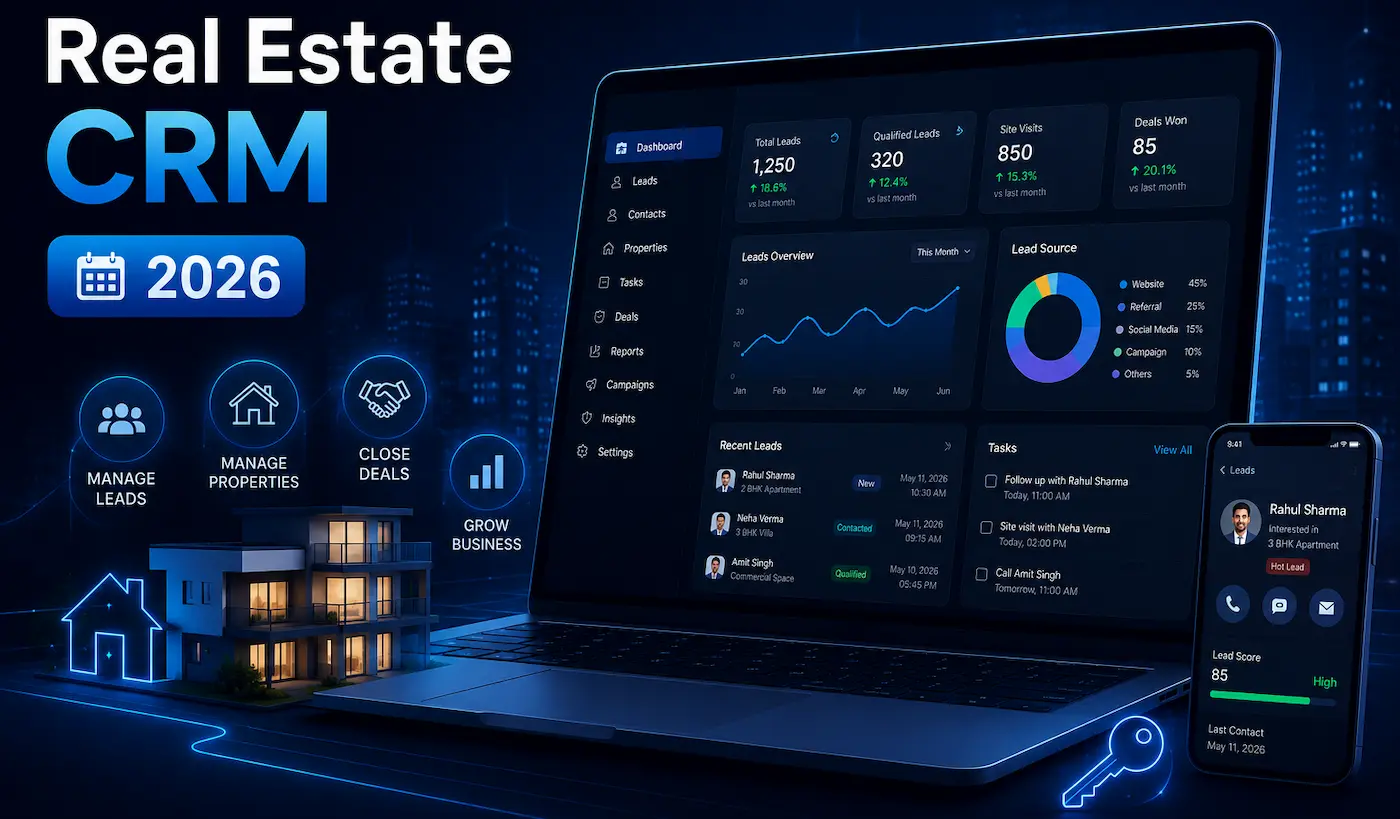
Instead of juggling spreadsheets, WhatsApp messages, and mental notes, a real estate CRM gives you a single dashboard where every lead is visible, every follow-up is scheduled, and nothing slips through.
What makes a real estate CRM different from a generic CRM?
Generic CRMs like Salesforce and HubSpot are powerful all-in-one tools, but they’re built for software sales teams with fast-moving, high-volume cycles. They’re complex, expensive, and fundamentally misaligned to how real estate actually works: site visits, property matching, channel partner management, multiple projects running at once. For real estate, simplicity steals the game.
A real estate CRM is designed specifically for this industry. It understands that a “lead” in real estate isn’t just a contact — it’s someone with a budget, a location preference, a project interest, and a timeline. It tracks all of that, not just a name and phone number.
To explore this topic further, read our detailed comparison of Real Estate CRM vs. Generic CRM.
Key Features to Look for in a Real Estate CRM
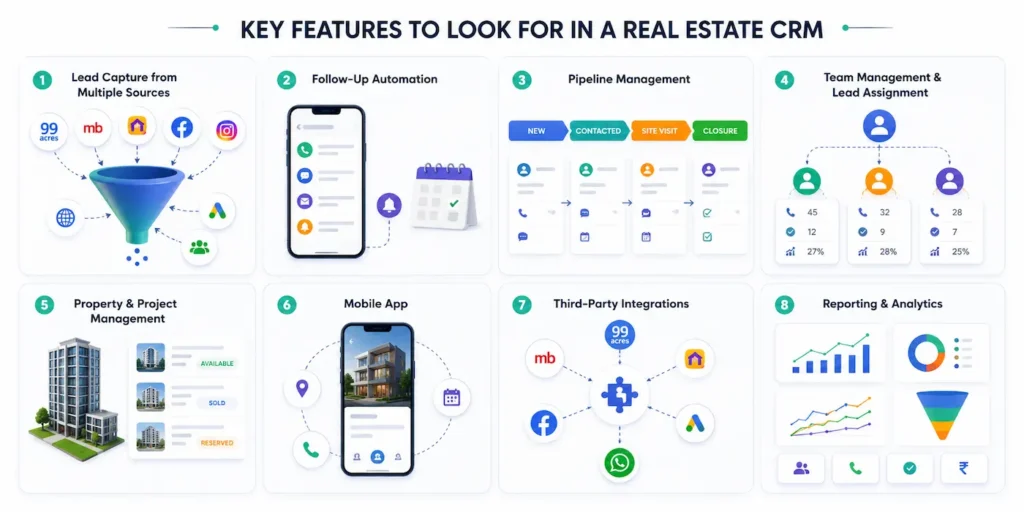
Not every CRM delivers the same value. Here’s what matters:
Lead Capture from Multiple Sources
The CRM should automatically pull in leads from all your marketing channels: property portals, social media, paid ads, and your website. Manual data entry kills efficiency and introduces errors.
Follow-Up Automation
Automated reminders, scheduled calls, and follow-up sequences ensure no lead goes untouched. This is often the single biggest ROI feature for real estate teams.
How fast that follow-up actually happens matters just as much as whether it happens at all – see our guide to speed to lead for the data behind it
Pipeline Management
A visual pipeline that shows every lead stage, from first inquiry to site visit to closure. This gives both agents and managers complete visibility at once.
Team Management and Lead Assignment
For agencies and builders, the ability to assign leads to specific agents, manually or automatically, and track their activity is essential. Look for performance dashboards that show call logs, updates, and conversion rates per agent.
Also read: our guide to lead routing for a deeper look at this feature.
Property and Project Management
The CRM should let you manage your listings and projects, track availability, and match properties to leads based on requirements. This is especially important for builders running multiple projects.
Mobile App
Real estate is a field job. Your agents are at site offices, at client meetings, and on the road. A CRM that only works on a desktop is a CRM that doesn’t get used. A strong mobile app is non-negotiable.
Third-Party Integrations
Your CRM should connect with the platforms you already use: 99acres, MagicBricks, Housing.com, Facebook Lead Ads, Google Ads, and communication tools. Every integration is a source of leads that no longer needs to be manually entered.
Reporting and Analytics
Data you can’t act on is just noise. Look for reports that show you lead source performance, team conversion rates, site visit tracking, and deal velocity. This is how you make decisions instead of guessing.
Why are Real Estate Agents Losing Leads?
Real estate agents are not to be blamed for this. Most professionals have already put in efforts. The real issue is the lack of a proper system to track, manage, and follow up on leads.
Here’s what typically happens without a CRM:
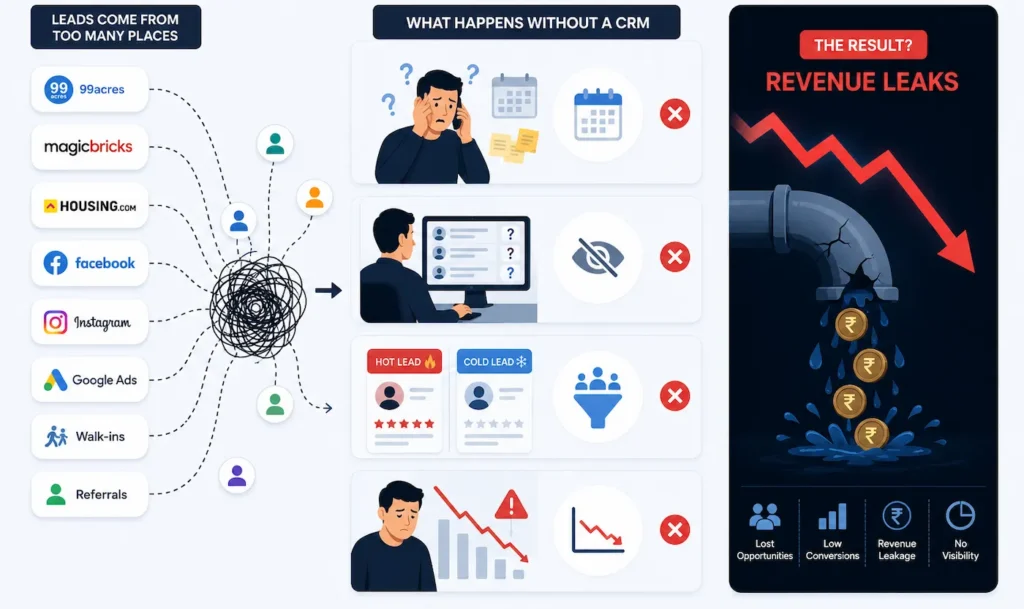
Leads come from too many places. 99acres, MagicBricks, Housing.com, Facebook, Instagram, Google Ads, walk-ins, referrals: every source drops leads into a different bucket. There’s no single place where all of them live.
Follow-up depends on memory. Without reminders and a clear next action assigned to every lead, follow-up happens when someone remembers to do it. Inevitably, some leads never get a second call.
There’s no visibility across the team. A team lead has no real-time view of what their agents are doing, which leads are being worked on, and which have gone cold. Accountability is difficult to enforce without data.
Lead quality gets lost in the noise. A hot lead who asked for a specific configuration gets treated the same as a cold inquiry that just browsed. Without segmentation, the best opportunities don’t get the attention they deserve.
The result? Revenue leaks. Not because the leads weren’t good enough, but because the system to handle them didn’t exist.
This exact pattern – leads lost to slow or inconsistent follow-up – is what we unpack in our piece on why real estate agents struggle to convert leads.
How Leadrat Real Estate CRM Fixes This
A real estate CRM doesn’t just store contacts. It structures your entire sales process.
Here’s what changes when you implement one:
Lead sourcing. Every lead from every source: portals, social media, website, walk-ins; flows into a single dashboard. Your team stops working on five different lists.
Automated follow-up reminders. Every lead has a next action attached to it. The CRM reminds your team when to call, message, or visit; so follow-up stops being optional.
Lead assignment. Leads get automatically or manually assigned to the right agent immediately. No lead sits unattended because nobody knew it had come in.
Pipeline visibility. You can see exactly where every lead is in your sales process: new inquiry, contacted, site visit scheduled, negotiation, closed. The pipeline doesn’t lie.
Team performance tracking. Who’s converting? Who’s letting leads go cold? A real estate CRM gives you data to coach your team and reward your best performers.
Property and project management. Match leads to properties based on their requirements. Track availability, update listing status, and manage documentation; all connected to your lead pipeline.
WhatsApp-first communication Modern real estate sales teams work on the move. A WhatsApp-first CRM helps agents manage conversations, follow-ups, updates, and client communication from anywhere, at any time, directly from their phones. The system adapts to how modern field sales teams actually work.
CRM vs Spreadsheet: Why Real Estate Teams Make the Switch
Most real estate professionals start with spreadsheets. It makes sense:they’re free, familiar, and flexible.
But spreadsheets have a ceiling. And most growing real estate teams hit it fast.
Some teams move to generic CRMs like Salesforce or HubSpot. But real estate has its own sales cycle, follow-up structure, site visit workflow, and team coordination challenges that generic systems often fail to handle properly.
That’s why growing real estate teams eventually switch to a dedicated real estate CRM.
|
Aspects |
Spreadsheet |
Generic CRM |
Real Estate CRM |
|
Lead capture |
Manual entry |
Limited integrations |
Automatic from all sources |
|
Follow-up reminders |
None (or calendar hacks) |
Available but generic |
Built-in, automated |
|
Team visibility |
Difficult to share in real-time |
Partial visibility |
Live dashboard for all |
|
Lead assignment |
Manual, often delayed |
Basic workflows |
Instant, automatic or manual |
|
Reporting |
Manual formulas |
Generic reports |
Real estate-specific reports |
|
Mobile access |
Limited |
Mobile app available |
Dedicated field-sales-friendly app |
|
WhatsApp integration |
None |
Limited or external |
Built-in WhatsApp-first communication |
|
Property management |
Not possible |
Not built for property workflows |
Property and inventory management |
The moment you’re managing more than 20–30 leads at a time, or you have more than one person working leads, a spreadsheet starts impacting your real estate sales process and costing you deals.
Choosing the Right Real Estate CRM for Your Situation
There’s no single “best” real estate CRM; the right one depends on your setup.
For a full comparison of platforms, read our roundup of the top 17 real estate CRMs in India.
If you’re a solo agent or broker: You need something simple, fast, and mobile-first. You don’t need complex team management features. Focus on lead capture, follow-up reminders, and a clean pipeline view. The CRM should take less than a day to set up.
If you run an agency or team: Team management becomes critical. You need lead assignment, performance tracking, and visibility across your agents. Look for a CRM that lets you set targets, track activity, and generate team-level reports: not just individual lead tracking.
If you’re a builder or developer: Your needs are more complex. You’re managing multiple projects, multiple unit types, a channel partner network, and a larger sales team. You need a CRM that can handle project-level segmentation, CP management, site visit tracking across projects, and detailed sales analytics by project.
If you manage a channel partner network, our complete guide to channel partners in real estate covers how CPs fit into this workflow – and if your operations span finance and construction too, our real estate ERP vs CRM comparison can help you decide which system to lead with.
Questions to ask before you commit to any CRM:
- Does it integrate with the lead sources we already use?
- Is there a mobile app that actually works?
- How long does onboarding take?
- What does support look like – email only, or real humans?
- Is it built for real estate, or adapted from a generic tool?
Common Mistakes when Implementing a Real Estate CRM
Getting a CRM is step one. Using it well is a different challenge. These are the mistakes that cost teams the most:
Not training the team properly. A CRM only works if everyone uses it consistently. If two agents log calls and three don’t, your data is useless. Invest time in onboarding every team member.
Importing bad data. If you import a spreadsheet full of cold, outdated leads, your pipeline will be cluttered from day one. Clean your data before you migrate.
Over-complicating the setup. Start with the basics: lead capture, assignment, follow-up, and pipeline stages. Add complexity once the team is comfortable with the fundamentals.
Not using the reports. The data in your CRM is only valuable if someone reviews it and acts on it. Set a weekly review as a non-negotiable habit.
Treating it as optional. A CRM becomes useless the moment team members start working outside it. The rule has to be simple: if it’s not in the CRM, it doesn’t exist.
How Leadrat Helps Real Estate Teams Manage Sales, Leads, and Projects
LeadRat is a real estate CRM built specifically for the Indian and Dubai markets — for agents, agencies, and builders who are serious about not losing leads.
Here’s what it does in practice:
Centralised lead capture
Leads from 99acres, MagicBricks, Housing.com, Facebook, Instagram, your website — all flow into one dashboard automatically. Your team stops manually entering data and starts working on leads immediately.
Instant lead assignment
The moment a lead comes in, it gets assigned to the right agent, automatically or manually. No lead sits unattended.
Follow-up reminders and tracking
Every lead has a next action. LeadRat reminds your team when to follow up, logs every call and update, and makes sure nothing falls through.
Pipeline and property management
Manage your projects, track unit availability, match leads to properties based on their requirements ,all inside the same system.
Team management and performance reports
Set targets, track activity, and measure conversions. Know who your top performers are and who needs coaching with data, not gut feel.
Property Scoring
Agents instantly see which properties best match each lead, on the go, ranked by budget, location, bedrooms, and project fit. No manual searching, no wrong pitches. The right property for the right lead, every time.
Mobile-first
LeadRat works on mobile for agents in the field. Site visits, calls, updates, all logged on the go.
Wrapping Up
A real estate CRM isn’t a luxury for large teams. It’s the foundation of a predictable, scalable sales process — whether you’re a solo agent, an agency, or a builder with multiple projects.
The leads you’re generating are only as valuable as your ability to follow up on them consistently. Without a system, you’re leaving revenue on the table every single week.
The right CRM changes that.
1,700+ companies across India and Dubai use Leadrat from solo brokers to large builder sales teams.
Your competition is already here.
Frequently Asked Questions
What is a real estate CRM?
A real estate CRM is a software tool that helps agents, agencies, and builders manage leads, track follow-ups, and close more deals by centralising all customer and property data in one place.
Do I need a CRM if I'm a solo real estate agent?
Yes. Even as a solo agent, a CRM helps you follow up consistently, track where your leads stand, and never lose a hot prospect to a missed call or forgotten reminder. The ROI of even one recovered deal outweighs the cost.
What's the difference between a general CRM and a real estate CRM?
A general CRM is built for any sales process. A real estate CRM is built specifically for property sales — it handles site visits, property matching, channel partner management, portal integrations, and the specific stages of a real estate deal that generic tools don’t understand.
How long does it take to set up a real estate CRM?
A well-designed real estate CRM should be up and running within a day or two. The onboarding process typically involves importing your existing leads, connecting your lead sources, and training your team on the workflow.
Is a real estate CRM worth it for small teams?
Absolutely. In fact, small teams often see the biggest impact because every lead matters more when volume is lower. The difference between following up with 90% of your leads vs 50% is felt immediately in a small team’s revenue.
What integrations should a real estate CRM have?
At minimum: 99acres, MagicBricks, Housing.com, Bayut, Facebook Lead Ads, and Google Ads. These are the primary lead sources for most Indian real estate teams. For Dubai, Bayut, Property Finder and Tik Tok are essential.
Can I use a real estate CRM on my phone?
Yes — and you should. Most site visits, field calls, and client meetings happen outside the office. A mobile app that lets agents log updates, check their pipeline, and receive follow-up reminders on the go is essential.