
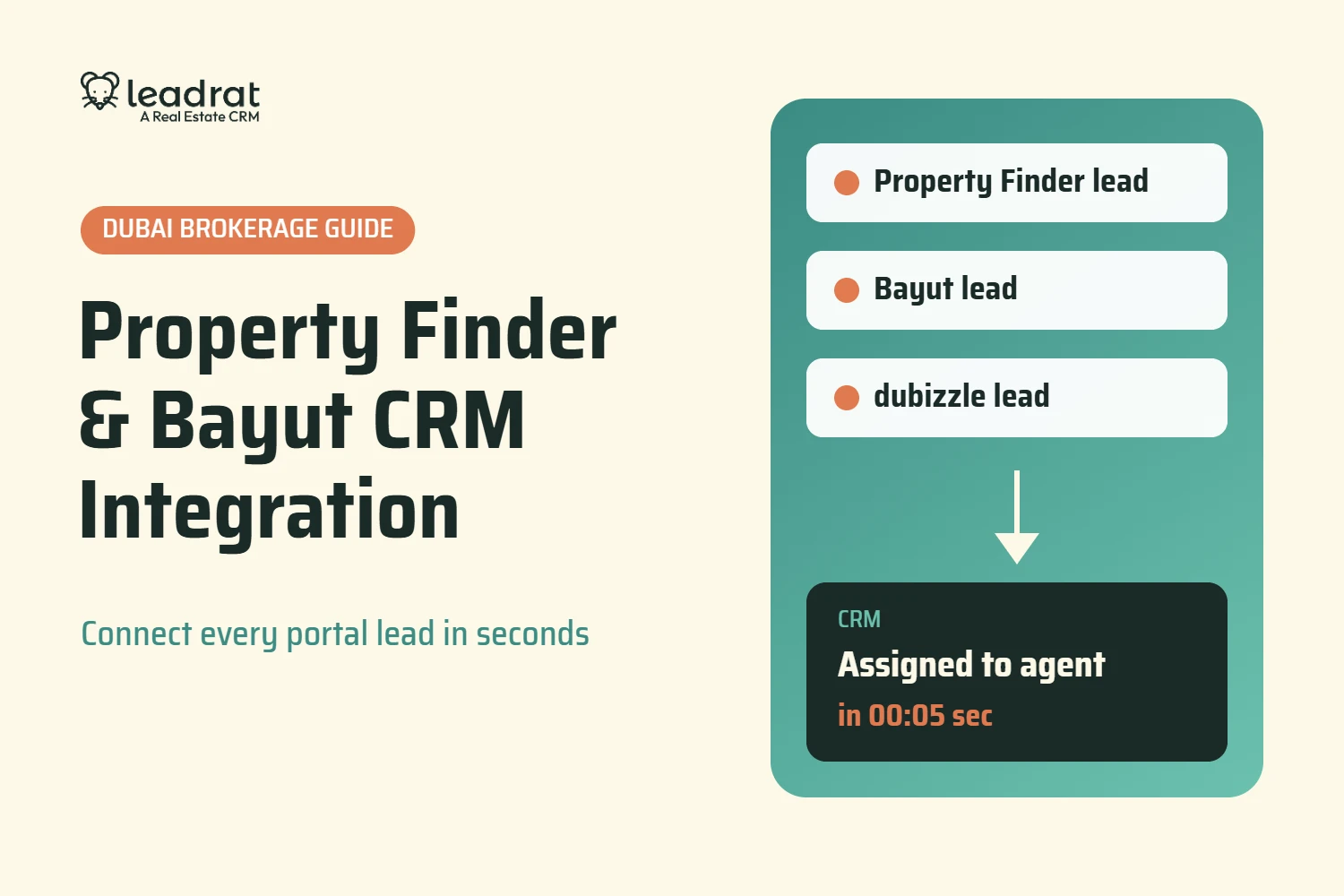
A Dubai brokerage can pay for premium listings on Property Finder and Bayut and still lose the buyer to a forty-minute delay. The enquiry lands in a portal inbox. Someone copies it into a sheet. By the time an agent calls, the buyer has already spoken to two other agencies about the same apartment.
Speed matters more than most teams admit. A Harvard Business Review study of 2,241 companies found that firms that contacted a lead within an hour were nearly seven times as likely to qualify it as firms that waited longer. In a portal market, where the same buyer messages three agents in one evening, the window is far shorter than an hour.
This guide explains how Property Finder and Bayut leads reach a CRM, what the Property Finder API (Enterprise API 2.0) actually does, how Bayut and dubizzle leads are handled, and the exact setup that gets every portal enquiry to the right agent in seconds.
Key Takeaways
- Portal leads can reach your CRM in three ways: manual export, email parsing or a direct API connection. Only the API keeps pace with Dubai buyers.
- Property Finder’s Enterprise API 2.0 lets an agency’s CRM manage listings, users and leads directly. Access is free, and keys are created from a Decision Maker account in PF Expert.
- Bayut and dubizzle leads arrive by email, SMS, phone, WhatsApp and chat, and are managed in Profolio. CRM sync works through an API key from Bayut.
- Connecting the feed is half the job. Assignment rules, duplicate checks and response-time SLAs decide whether the lead converts.
- Track revenue by portal, not just lead count, before you renew a portal package.
What Is Property Finder and Bayut CRM Integration?
Property Finder and Bayut CRM integration is a direct connection that sends every portal enquiry, with the buyer’s details and the listing they asked about, into your CRM automatically, where it’s assigned to an agent and tracked to a booking or close.
It replaces copying leads from portal dashboards, emails or Excel exports, and it often runs the other way too, pushing listings from the CRM to the portals.
Why Manual Portal Lead Handling Costs Dubai Brokerages Deals
Most brokerages start by checking each portal dashboard and passing leads on through WhatsApp groups. It works at ten leads a day. At a hundred, it breaks in four predictable places.
- Delay. Every manual step adds minutes. Leads that arrive after office hours or on Friday evenings can wait until the next morning.
- Duplicates. A buyer who enquires about the same tower on Property Finder and Bayut becomes two leads, often given to two agents who then argue over ownership.
- Lost context. A copied phone number without the listing reference forces the agent to ask the buyer what they enquired about. That’s a poor first impression.
- No attribution. If leads aren’t tagged by portal, channel and listing, nobody can tell which portal package actually produces deals.
Each of these is a process problem. A good integration fixes all four at once, because the data arrives complete, tagged and timestamped.
Three Ways Portal Leads Reach a CRM
| Method | How it works | Speed | Data quality | Best for |
|---|---|---|---|---|
| Manual export | Download leads from PF Expert or Profolio as Excel and upload them | Hours to days | Patchy, depends on who uploads | Very small teams only |
| Email parsing | Portal lead emails are forwarded and read into the CRM | Minutes | Breaks when email templates change; calls and WhatsApp leads are missed | A short-term stopgap |
| API integration | The portal sends or the CRM pulls leads through an official API | Seconds to minutes | Complete and structured, including listing reference and channel | Any brokerage that relies on portal leads |
Email parsing is the trap most teams fall into. It looks automated, but portal lead emails change format without notice, and phone and WhatsApp enquiries never generate the same email. The API route is the only one that captures every channel reliably.
The Property Finder API: How Enterprise API 2.0 Works
Property Finder’s current integration route for agencies that use an external CRM is Enterprise API 2.0. According to Property Finder’s Enterprise API 2.0 guide, it lets an agency’s CRM connect directly to Property Finder to:
- Manage listings: create, update, publish and boost them from the CRM.
- Receive leads: enquiries flow straight into the CRM for processing.
- Manage users: add, update and remove agent profiles.
- Check credits: view the agency’s credit balance.
Listing verification through the API is limited to Dubai and still in development, so verification requests are currently submitted through PF Expert 2.0.
Who can get Property Finder API access
Access is free. Production API keys and sandboxes are created by a user with a Decision Maker account in PF Expert. A CRM provider can’t create a sandbox on the agency’s behalf. The agency has to share the credentials.
| Detail | What Property Finder specifies |
|---|---|
| Cost | Free for agencies |
| Who creates keys | A Decision Maker account in PF Expert |
| Where | Developer Resources, then API Credentials, then New API Key |
| Active keys | Up to 3 at a time |
| Key validity | Up to 365 days, then a new key is needed |
| Rate limit | 60 requests per minute |
| Support | integration.support@propertyfinder.ae |
Shortlisted CRM or custom build
Property Finder keeps a list of shortlisted CRMs that are already built on Enterprise API 2.0. For these, the agency simply generates a production key and the CRM provider enables it. Leadrat is one of the shortlisted CRMs.
If your CRM isn’t on the list, the process is longer. You create a sandbox, build and test the integration against Property Finder’s sandbox documentation, then generate a production key and enable the integration on your live account. Note that lead testing isn’t yet supported in the sandbox, so the lead flow can only be fully checked once you go live.
Put the key’s expiry date in your calendar. A key that quietly expires on a Thursday night means a weekend of leads that never reach anyone.
Bayut and dubizzle Leads: How They Reach Your CRM
Bayut and dubizzle are run by the same group, and agents manage listings for both in Profolio (formerly BayutPro). Leads in Profolio are sorted into five channels: email, SMS, phone, WhatsApp and chat. Agents can view messages and call recordings, and leads can be exported to Excel.
Exporting isn’t integration. For an automatic flow, ask your Bayut account manager for API access for your CRM. Your CRM uses the API key to sync new leads on a short, regular interval, so every enquiry lands in one place regardless of channel.
One detail matters more on Bayut than elsewhere: call leads. Many portal buyers call rather than type. Make sure your integration captures phone and WhatsApp enquiries, not only email, or the CRM will undercount your best leads.
Listing quality also affects lead volume. Bayut’s Checked and TruCheck badges, which need documents such as Form A and an on-site photo, can raise a listing’s ranking. If you need a refresher on Form A, see our guide to RERA forms in Dubai.
How to Connect Property Finder and Bayut to Your CRM: Step by Step
- List every source. Note each portal account, sub-account and channel your team uses, including dubizzle and any other portals.
- Get credentials. Generate a Property Finder production key from a Decision Maker account, and request API access from your Bayut account manager.
- Map the fields. Decide where each piece of portal data goes in the CRM. Use the table below as a checklist.
- Set assignment rules. Route leads by portal, project, community, language or budget, so the right specialist gets them first.
- Turn on duplicate and re-enquiry checks. A buyer who enquires twice should update one record, not create two.
- Set a response SLA and fallback. If an agent doesn’t act within, say, five minutes, the lead moves to the next agent automatically.
- Test with live enquiries. Send a real enquiry on each portal and channel, and time how long it takes to reach an agent’s phone.
- Track revenue by source. Tag every booking and closed deal with its portal, so renewal decisions rest on revenue, not lead counts.
Portal lead field mapping
| Portal data | CRM field | Why it matters |
|---|---|---|
| Buyer name, phone and email | Contact details | Needed for the first call and for duplicate checks |
| Portal name | Lead source | Powers source reports and cost per deal |
| Channel (call, WhatsApp, email, chat, SMS) | Sub-source | Shows how buyers prefer to reach you |
| Listing reference | Enquired property or project | Lets the agent open the call with the right unit |
| Message text | Notes | Captures budget, timing and questions |
| Enquiry time | Created date | Starts the response-time clock |
| Assigned portal agent | Lead owner | Keeps listing agents and lead owners in sync |
Connect Property Finder, Bayut and dubizzle in one place. Leadrat captures every portal enquiry, assigns it in seconds and tracks it to the deal. Book a free Leadrat demo.
What Happens After the Lead Lands Decides the Deal
An integration only moves data. Conversion depends on what the system does in the next five minutes. In Leadrat, a portal lead goes through four steps automatically.
| Step | What Leadrat does | Why it matters |
|---|---|---|
| Capture | Pulls leads from Property Finder, Bayut, dubizzle and Skyloov with the listing and channel attached | Nothing is copied by hand, and nothing is missed |
| Check | Detects duplicates and repeat enquiries, and links them to the existing record | One buyer, one owner, full history |
| Assign | Routes the lead by source, project, location or percentage split, instantly | The right agent calls first |
| Escalate | Reassigns the lead if the agent doesn’t act within the set time, across several cycles | No lead sits untouched |
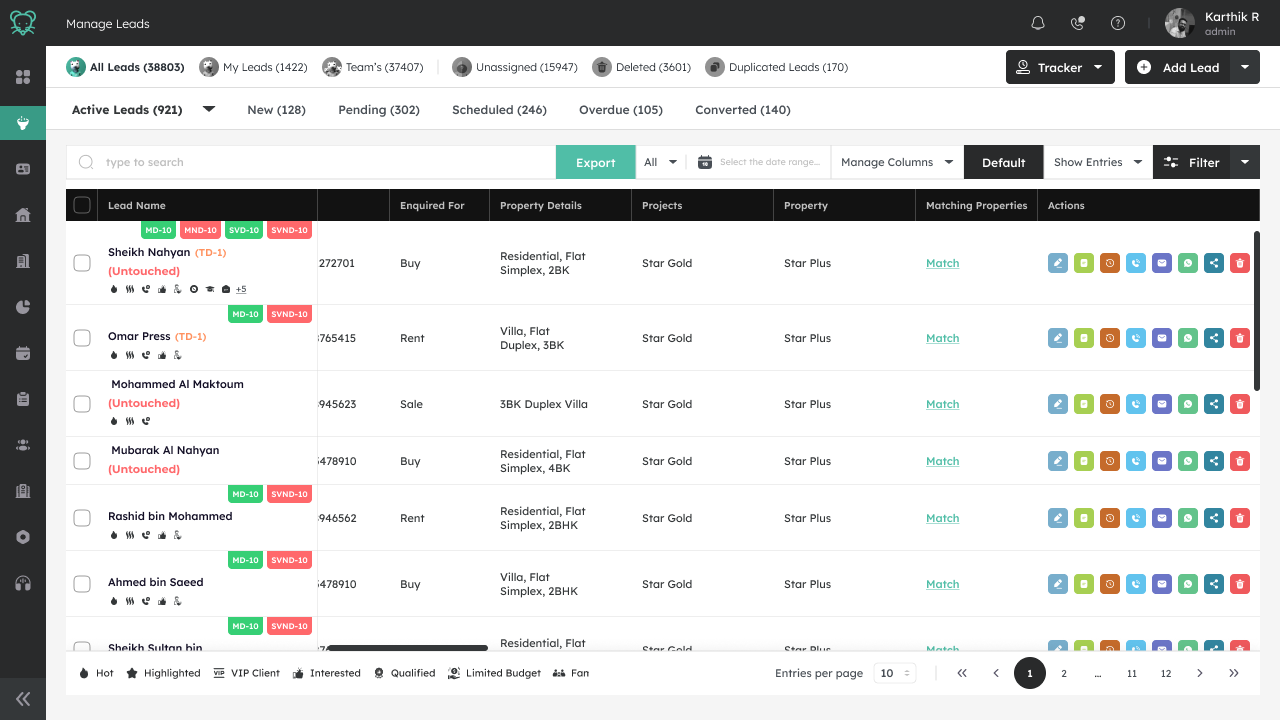
Once the lead is with the agent, the rest of the toolkit takes over. The mobile app shows the caller’s details when a known lead rings, without the agent saving the contact. WhatsApp follow-ups run from the CRM. And Matching Properties suggests other units that fit the buyer’s brief, which matters when the advertised unit has already gone.
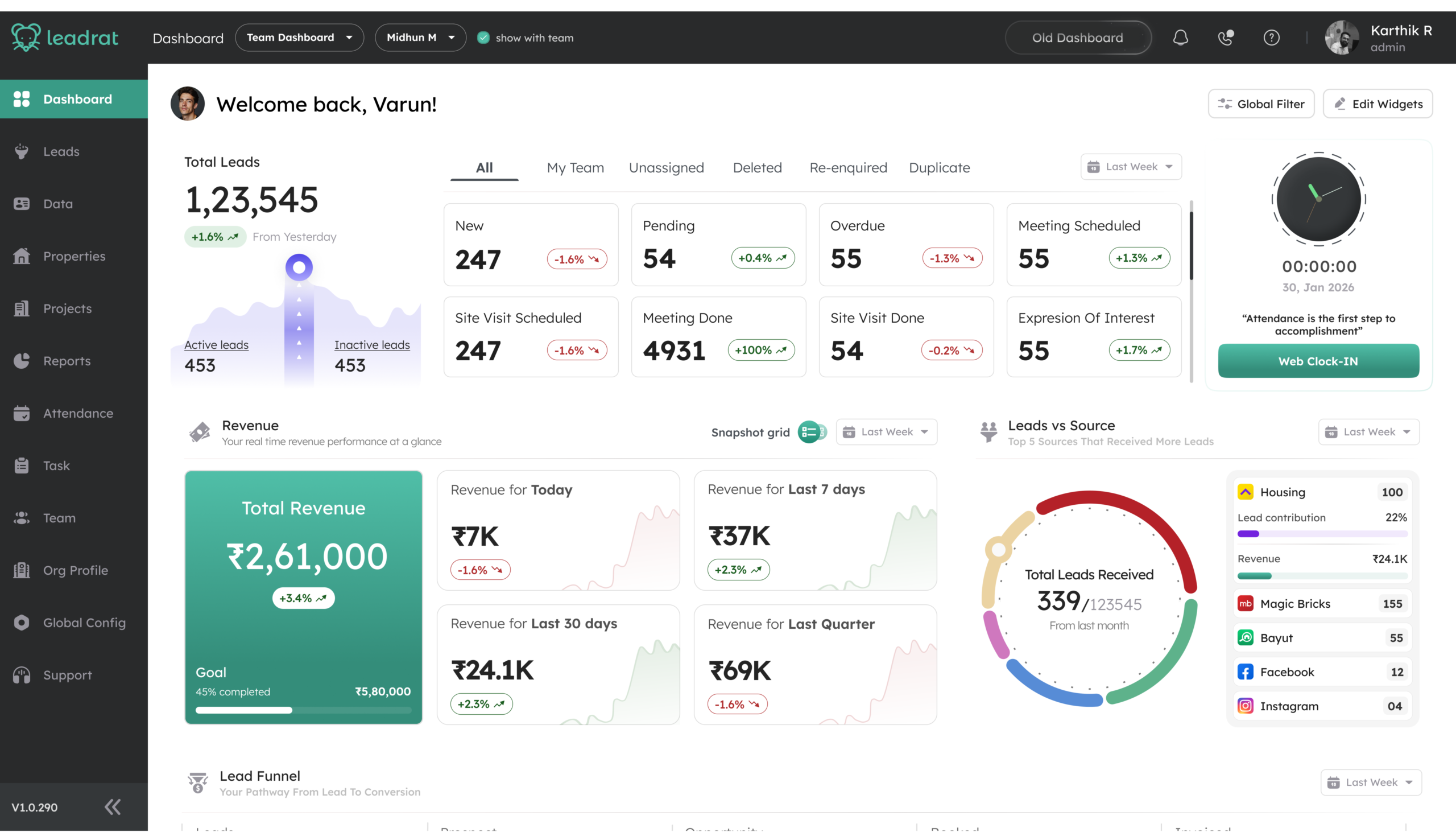
For managers, the Leads vs Source widget on the Leadrat dashboard shows each portal’s lead count, share of total leads and the revenue it produced. That’s the number to bring to your next portal renewal meeting.
Common Portal Integration Mistakes
| Mistake | What happens | The fix |
|---|---|---|
| Capturing email leads only | Phone and WhatsApp enquiries are missing from reports | Confirm every channel flows into the CRM |
| Letting API keys expire | Leads silently stop arriving | Track expiry dates and renew early |
| No duplicate rules | Two agents chase one buyer | Turn on duplicate and re-enquiry detection |
| Assigning by turn only | Specialists get leads they can’t serve | Route by project, community or language |
| Judging portals by lead volume | Budget goes to the noisiest source | Compare revenue and closed deals by portal |
| Testing in sandbox only | Lead flow fails on go-live | Send real enquiries on every channel after launch |
Selling or leasing a listing you’ve advertised? Our guides to selling property in Dubai and buying property in Dubai cover the transaction steps your buyers will ask about.
Stop losing portal leads to slow hand-offs. Leadrat is a shortlisted Property Finder Enterprise API CRM, used by over 38,000 agents across the UAE and India. Get your free demo today.
Frequently Asked Questions
Does Property Finder have an API?
Yes. Property Finder’s Enterprise API 2.0 lets agencies connect an external CRM to manage listings, users and leads. Access is free, and keys are created from a Decision Maker account in PF Expert.
How do I get a Property Finder API key?
Log in to PF Expert with a Decision Maker account, go to Developer Resources, then API Credentials, and create a new API key. If your CRM is shortlisted, the provider enables it for you.
What is the Property Finder API rate limit?
Property Finder sets a limit of 60 requests per minute, with up to three active keys at a time, each valid for up to 365 days.
Can Bayut leads go directly into a CRM?
Yes. Ask your Bayut account manager for API access. Your CRM then uses the API key to sync new Bayut and dubizzle leads automatically.
What channels do Bayut leads come from?
Profolio sorts Bayut leads into email, SMS, phone, WhatsApp and chat. A good integration should capture all five.
Is Leadrat integrated with Property Finder?
Yes. Leadrat is one of Property Finder’s shortlisted CRMs for Enterprise API 2.0, and it also integrates with Bayut, dubizzle and Skyloov.
How fast should a brokerage respond to a portal lead?
Within minutes. Buyers often contact several agents about the same listing, and research shows the chance of qualifying a lead drops sharply after the first hour.